Using AI to improve the human experience
This app is designed to bring users closer to artwork by intertwining their own ideas with artwork from the Art Institute of Chicago, and a little help from text-based generative AI.
Many people struggle to connect with art for various reasons including access to museums, time, and education in the field. I strive to solve this problem by bringing ARTIC to their browser, with a deepened level of connection through the use of generative AI.
See for yourself:
Tech Stack:
| Frontend & Logic | Python (language), Streamlit (UI) |
| Intelligence API | Gemini 3.1 Flash Lite |
| Other APIs | ARTIC API (Data base), Resend (Emails) |
| Security | DotEnv, OS |
| Dev tools | Copilot for Github (initial launch), ChatGPT (code review), Gemini (Process) |
Sample Slideshow:
*Please note that these screenshots and the code snippets shared below serve as a time capsule. Updates are made to improve the app regularly.
Toggle here to view the what, the why, and code snippets associated with each screenshot.
<> Imports & Early Config to know before jumping in:
import os
import random
import re
import requests
import streamlit as st
from dotenv import load_dotenv
from google import genai
import resend

# ---------------------------
# CONFIG
# ---------------------------
load_dotenv()

client = genai.Client(
    api_key=os.getenv("GEMINI_API_KEY")
)

resend.api_key = os.getenv(
    "RESEND_API_KEY"
)

ARTIC_API_URL = (
    "https://api.artic.edu/api/v1/artworks"
)

session = requests.Session()

# ---------------------------
# HEALTH CHECK MODE
# ---------------------------
query_params = st.query_params

if "health" in query_params:
    st.write("ok")
    st.stop()

# ---------------------------
# SESSION STATE
# ---------------------------
DEFAULT_STATE = {
    "artwork": None,
    "description": "",
    "interpretation": "",
    "reflection_text": "",
    "user_input": "",
    "show_email_input": False
}

for key, value in DEFAULT_STATE.items():

    if key not in st.session_state:

        st.session_state[key] = value
<> Image URLs, Email Validation & config for gemini prompts
# ---------------------------
# HELPERS
# ---------------------------
def build_image_url(image_id):

    return (
        f"https://www.artic.edu/iiif/2/"
        f"{image_id}/full/843,/0/default.jpg"
    )


def valid_email(email):

    pattern = r"^[^@]+@[^@]+\.[^@]+$"

    return re.match(pattern, email)


def ask_gemini(prompt):

    try:

        response = client.models.generate_content(
            model="gemini-2.5-flash",
            contents=prompt
        )

        if (
            response
            and hasattr(response, "text")
            and response.text
        ):

            return response.text.strip()

    except Exception as e:

        print(f"Gemini error: {e}")

    return "The archive remains quiet."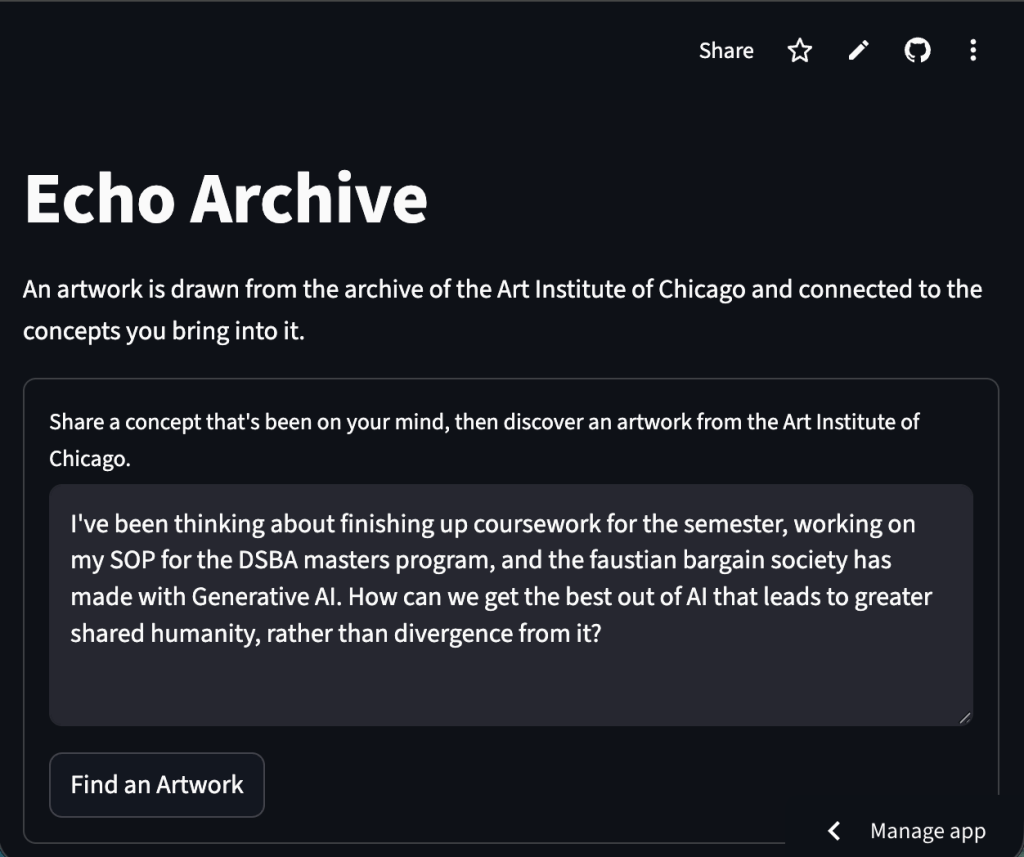
User first inputs a concept(s) they’ve been thinking of, then selects “Find an Artwork”
Why: Having the user define concepts before viewing the work forces their own intelligence or supportive intelligence (AI) to draw connections between their real world and the art.
<>User Input UI
# ---------------------------
# UI
# ---------------------------
st.title("Echo Archive")

st.write(
    "An artwork is drawn from the archive "
    "of the Art Institute of Chicago and "
    "connected to the concepts you bring into it."
)

# ---------------------------
# INPUT FORM
# ---------------------------
with st.form("archive_form"):

    user_input = st.text_area(
        "Share a concept that's been on your mind, then discover an artwork from the Art Institute of Chicago.",
        placeholder=(
            "A concept, memory, tension, idea, or feeling..."
        ),
        height=80
    )

    submitted = st.form_submit_button(
        "Find an Artwork"
    )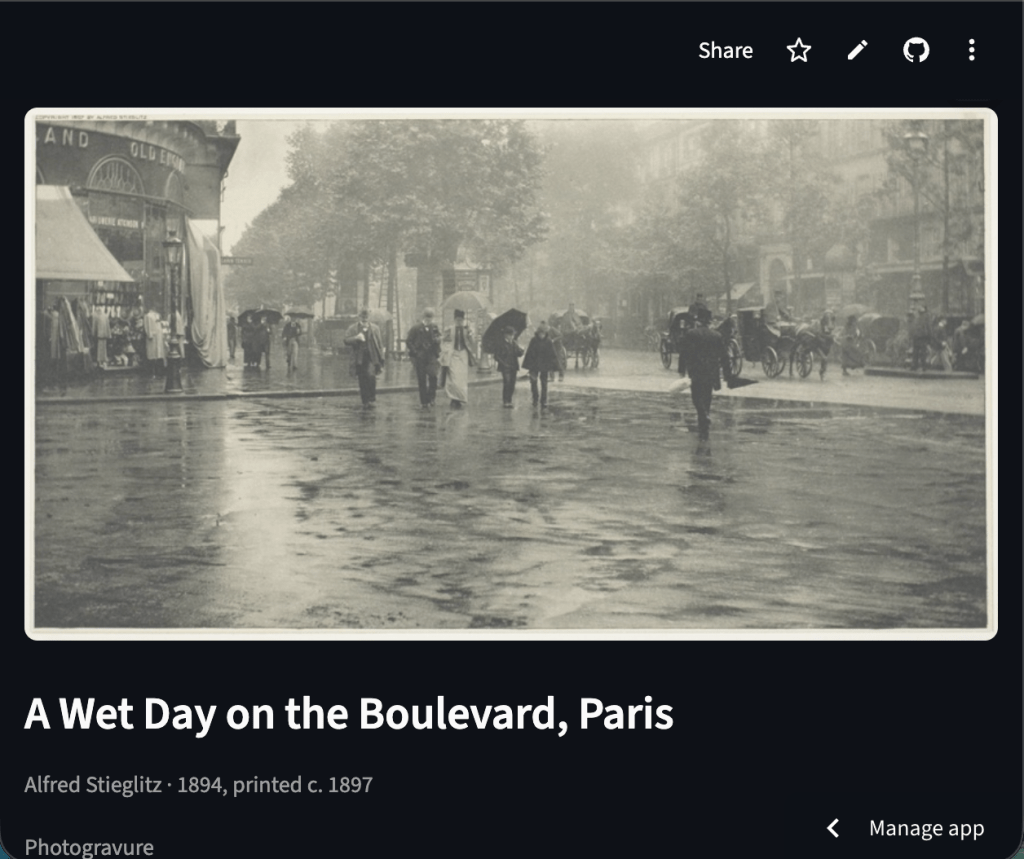
Artwork is selected via random page sampling from the Art Institute API, then filtered for usable metadata. Metadata is later used for robust descriptions.
Why: Surprise & Delight; Allows users to have one of a kind experience.
<>”Find an Artwork” UI
# ---------------------------
# SUBMISSION (user must submit concepts)
# ---------------------------
if submitted:

    if not user_input.strip():

        st.warning(
            "Please enter a thought first."
        )

        st.stop()

    st.session_state.user_input = (
        user_input
    )

    st.session_state.description = ""
    st.session_state.interpretation = ""
    st.session_state.reflection_text = ""
    st.session_state.show_email_input = False

    with st.spinner(
        "Searching the archive..."
    ):

        artwork = get_random_artwork()

    if artwork is None:

        st.error(
            "The archive returned nothing."
        )

        st.stop()

    st.session_state.artwork = artwork

# ---------------------------
# DISPLAY
# ---------------------------
if st.session_state.artwork:

    art = st.session_state.artwork

    st.image(
        art["image"],
        use_container_width=True
    )

    st.markdown(
        f"### {art['title']}"
    )

    st.caption(
        f"{art['artist']} · {art['date']}"
    )

    st.caption(
        art["medium"]
    )
<>Artwork Retrieval
# ---------------------------
# ARTWORK RETRIEVAL
# ---------------------------
def get_random_artwork(retries=5):

    for _ in range(retries):

        random_page = random.randint(1, 500)

        try:

            response = session.get(
                ARTIC_API_URL,
                params={
                    "page": random_page,
                    "limit": 25,
                    "fields": (
                        "id,title,image_id,artist_title,"
                        "artist_display,date_display,"
                        "medium_display,dimensions,"
                        "description,classification_title,"
                        "style_title,theme_titles,"
                        "provenance_text,exhibition_history"
                    )
                },
                timeout=10
            )

            response.raise_for_status()

            data = response.json().get(
                "data",
                []
            )

        except Exception as e:

            print(f"ARTIC API error: {e}")

            continue

        artworks = []

        for obj in data:

            image_id = obj.get("image_id")

            if not image_id:
                continue

            has_context = any([
                obj.get("description"),
                obj.get("provenance_text"),
                obj.get("artist_display"),
                obj.get("exhibition_history")
            ])

            if not has_context:
                continue

            artworks.append({
                "id": obj.get("id"),
                "title": obj.get("title") or "Untitled",
                "artist": (
                    obj.get("artist_title")
                    or "Unknown Artist"
                ),
                "artist_display": (
                    obj.get("artist_display")
                    or ""
                ),
                "date": (
                    obj.get("date_display")
                    or "Unknown Date"
                ),
                "medium": (
                    obj.get("medium_display")
                    or "Unknown Medium"
                ),
                "dimensions": (
                    obj.get("dimensions")
                    or ""
                ),
                "description": (
                    obj.get("description")
                    or ""
                ),
                "classification": (
                    obj.get("classification_title")
                    or ""
                ),
                "style": (
                    obj.get("style_title")
                    or ""
                ),
                "themes": (
                    obj.get("theme_titles")
                    or []
                ),
                "provenance": (
                    obj.get("provenance_text")
                    or ""
                ),
                "exhibition_history": (
                    obj.get("exhibition_history")
                    or ""
                ),
                "image": build_image_url(
                    image_id
                )
            })

        if artworks:

            return random.choice(
                artworks
            )

    return None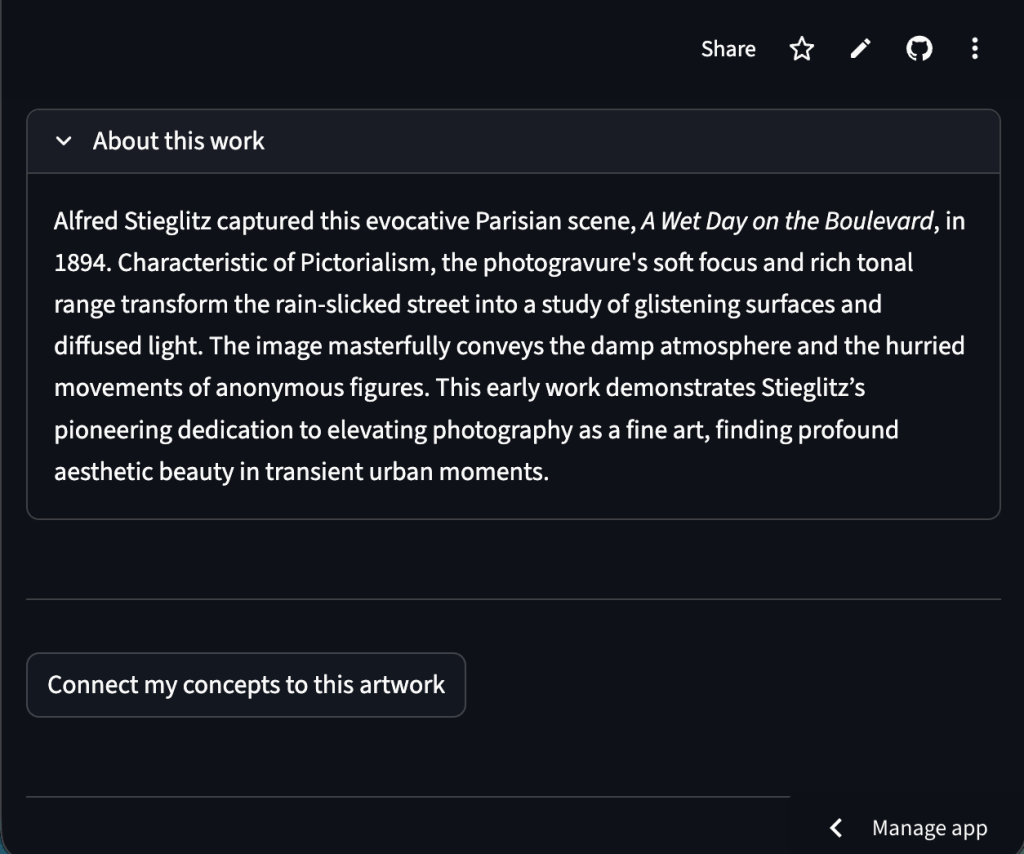
Gemini 3.1 Flash Lite is prompted to give an description based on retrieved metadata.
Why: My goal is to make the work feel alive to the viewer. Rich descriptions achieve that goal.
<> Gemini Description Prompt
# ---------------------------
# DESCRIPTION
# ---------------------------
def generate_description(artwork):

    prompt = f"""
    You are writing a concise curatorial
    description for a museum visitor. Your goal is
    to make art more relatbale to the public.
    Always reference principles of art and design
    present in the work, but make it accesible to layman.
    If the style of work is a response to historical events
    or artistic movements, please include that conext.


    Artwork Information:

    Title: {artwork['title']}
    Artist: {artwork['artist']}
    Artist Bio: {artwork['artist_display']}
    Date: {artwork['date']}
    Medium: {artwork['medium']}
    Classification: {artwork['classification']}
    Style: {artwork['style']}

    Themes:
    {
        ', '.join(artwork['themes'])
        if artwork['themes']
        else 'None listed'
    }

    Museum Description:
    {artwork['description']}

    Provenance:
    {artwork['provenance']}

    Exhibition History:
    {artwork['exhibition_history']}


    Guidelines:
    - Maximum 4 sentences
    - Use the archival context when relevant
    - Note the date for historical context
    - Connect visual qualities to material,
      historical, or atmospheric details
    - Allow subtle aesthetic language
    - Do not address the viewer directly
    - Do not over-explain symbolism
    - Avoid academic stiffness
    - Don't be too forceful

    Output only the description.
    """

    return ask_gemini(prompt)
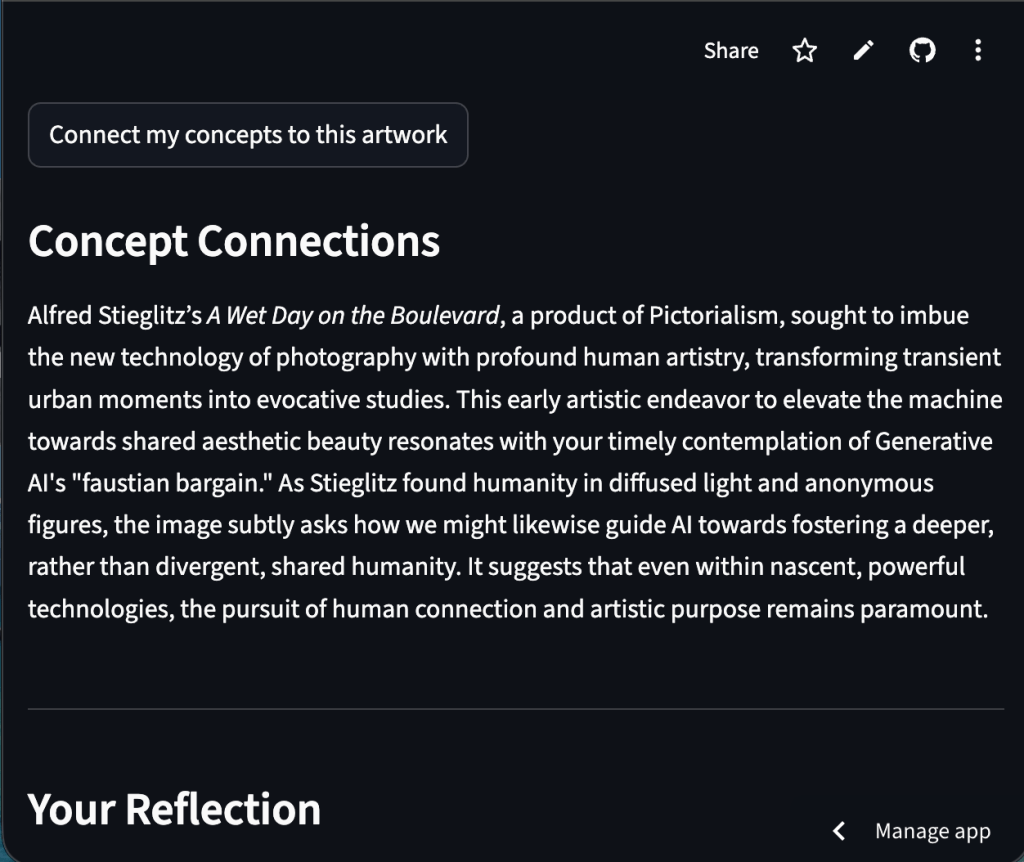
User can opt-in for Gemini to connect the work to their input
Why: Environmental impacts of UI, and push for balance of Human-AI thinking
<>Button to opt-in UI
    # ---------------------------
    # INTERPRET BUTTON
    # ---------------------------
    interpret = st.button(
        "Connect my concepts to this artwork"
    )

    if (
        interpret
        and not st.session_state.interpretation
    ):

        with st.spinner(
            "Connecting concepts to the artwork..."
        ):

            st.session_state.interpretation = (
                generate_interpretation(
                    st.session_state.user_input,
                    art,
                    st.session_state.description
                )
            )
<>Gemini “Interpretation” Prompt
# ---------------------------
# INTERPRETATION
# ---------------------------
def generate_interpretation(
    user_input,
    artwork,
    description
):

    prompt = f"""
    A user entered the following concept,
    thought, or tension:

    "{user_input}"

    Artwork:
    {artwork['title']}
    by {artwork['artist']}

    Visual Description:
    "{description}"

    Artwork Context:
    - Date: {artwork['date']}
    - Style: {artwork['style']}
    - Classification: {artwork['classification']}

    Themes:
    {
        ', '.join(artwork['themes'])
        if artwork['themes']
        else 'None listed'
    }

    Write a concise curatorial interpretation
    connecting the user's idea to the artwork.
    If the connection is loose or unexpected,
    acknowledge the contrast or coincidence
    rather than forcing coherence. Always end on a question
    that invites the user to reflect on the artwork.

    Guidelines:
    - Use both visual and historical contex
    - Consider artistic movements,
      tensions, and cultural atmosphere
    - Connections may be indirect,
      historical, atmospheric,
      material, or contrasting
    - Allow the artwork to resist,
      complicate, or soften
      the user's concept
    - The relationship does not need
      to be literal
    - Do not force symbolic agreement
      between the artwork and
      the user's idea
    - Do not overstate weak connections.
    - Avoid therapy-like language
    - Avoid mystical narration
    - Sound perceptive, historically aware,
      and aesthetically attentive
    - Maximum 4 sentences

    Output only the interpretation.
    """

    return ask_gemini(prompt)
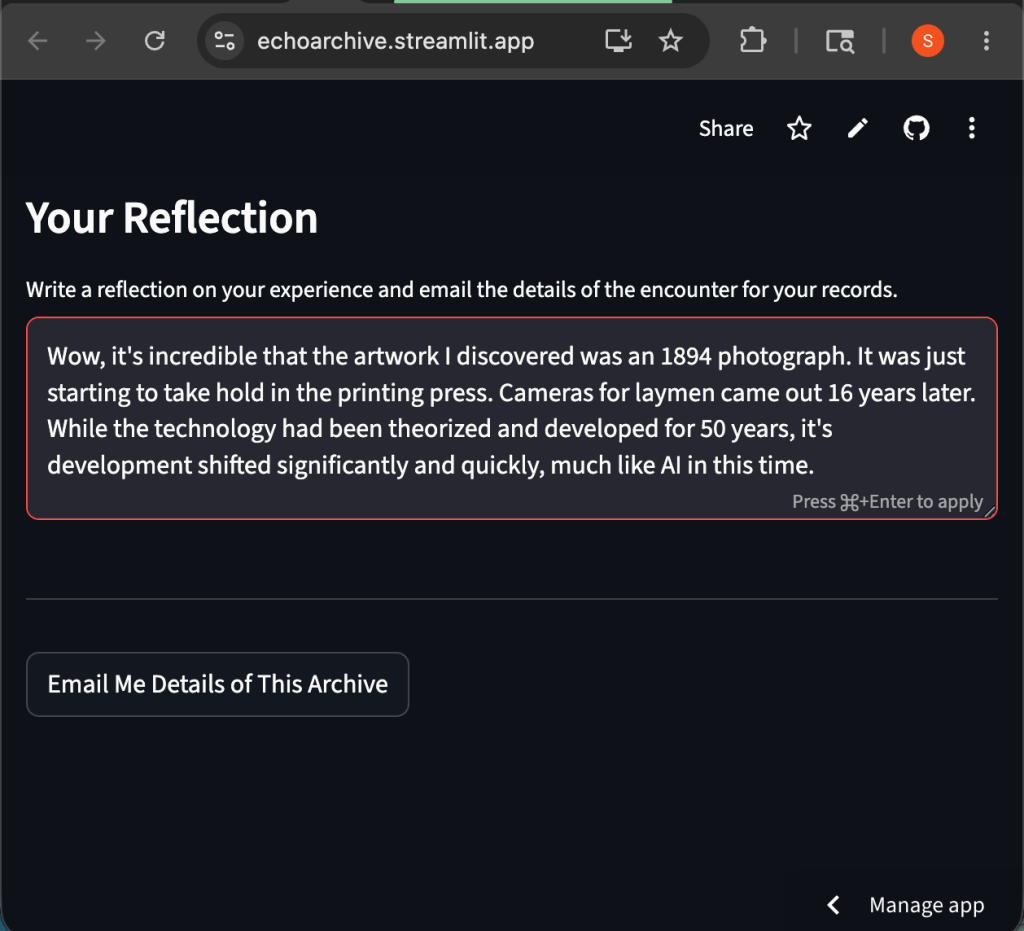
User can input a personal reflection of the work, with or without Gemini connecting concepts
Why: Making space for the human thought and connection within the UI, pushing for a balance in a world of artificial thinking.
<> User Input Reflection UI
    # ---------------------------
    # USER REFLECTION
    # ---------------------------
    st.markdown(
        "### Your Reflection"
    )

    reflection_text = st.text_area(
    "Write a reflection on your experience and "
    "email the details of the encounter for your "
    "records.",
    value=st.session_state.reflection_text
)
        height=140,
        placeholder=(
            "What connections or tensions emerge for you?"
        )
    )

    st.session_state.reflection_text = (
        reflection_text
    )

    st.divider()
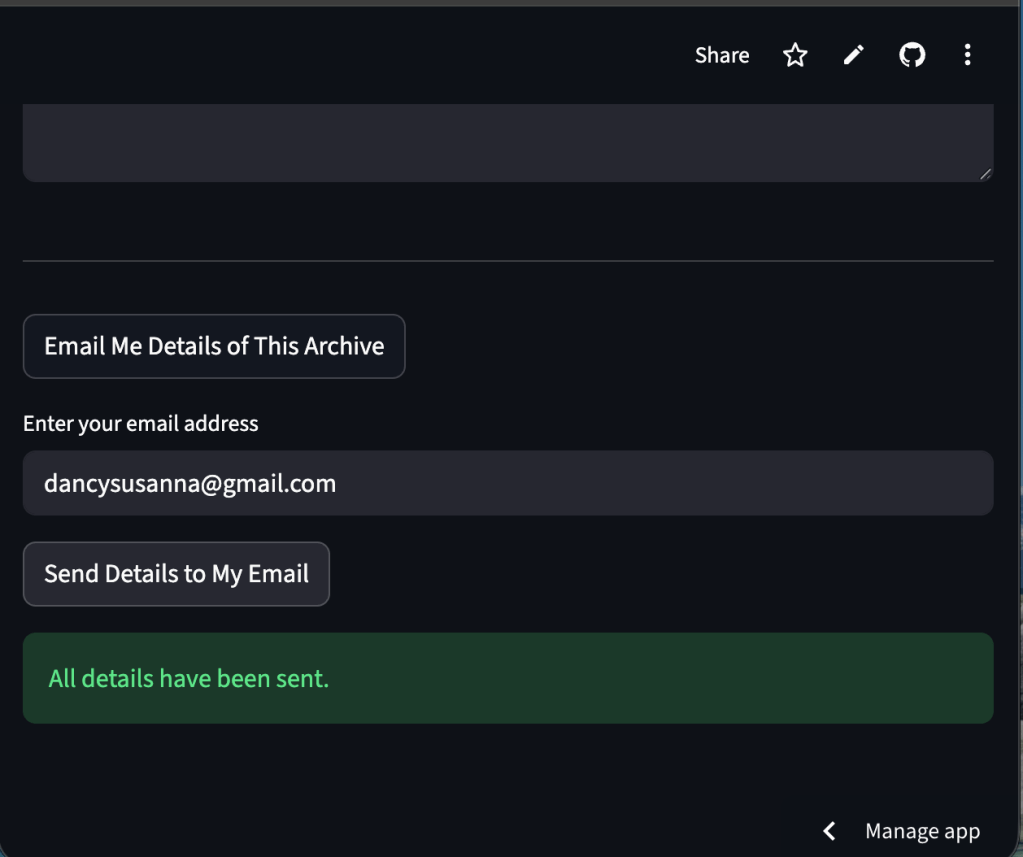
User can have all details sent to their email
Why: User creates an archive of their own, storing not only a url to the artwork, but all of the details captured throughout the encounter.
<> Email Archive UI
    # ---------------------------
    # EMAIL ARCHIVE
    # ---------------------------
    archive = st.button(
        "Email Me Details of This Archive"
    )

    if archive:

        st.session_state.show_email_input = True

    if st.session_state.show_email_input:

        email_input = st.text_input(
            "Enter your email address"
        )

        send = st.button(
            "Send Details to My Email"
        )

        if send:

            if not valid_email(
                email_input
            ):

                st.warning(
                    "Please enter a valid email."
                )

            else:

                with st.spinner(
                    "Archiving reflection..."
                ):

                    success = send_archive_email(
                        recipient_email=email_input,
                        artwork=art,
                        description=(
                            st.session_state.description
                        ),
                        interpretation=(
                            st.session_state.interpretation
                        ),
                        reflection=(
                            st.session_state.reflection_text
                        )
                    )

                if success:

                    st.success(
                        "All details have been sent."
                    )

                else:

                    st.error(
                        "Unable to send email."
                    )
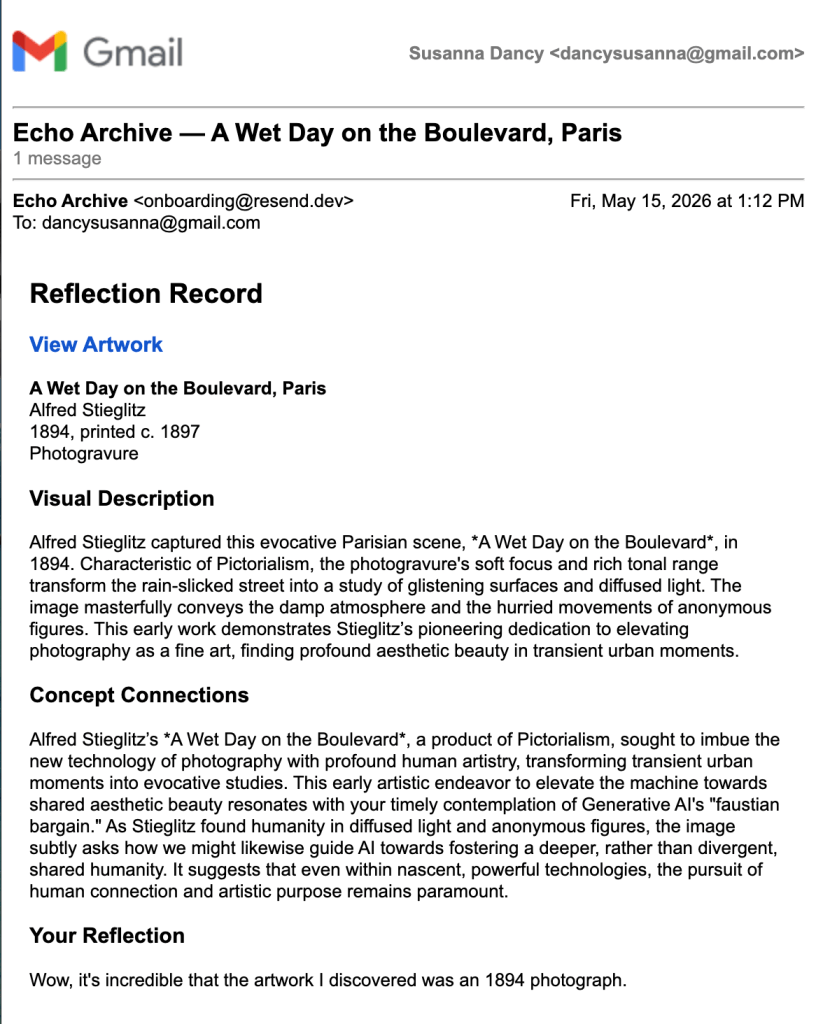
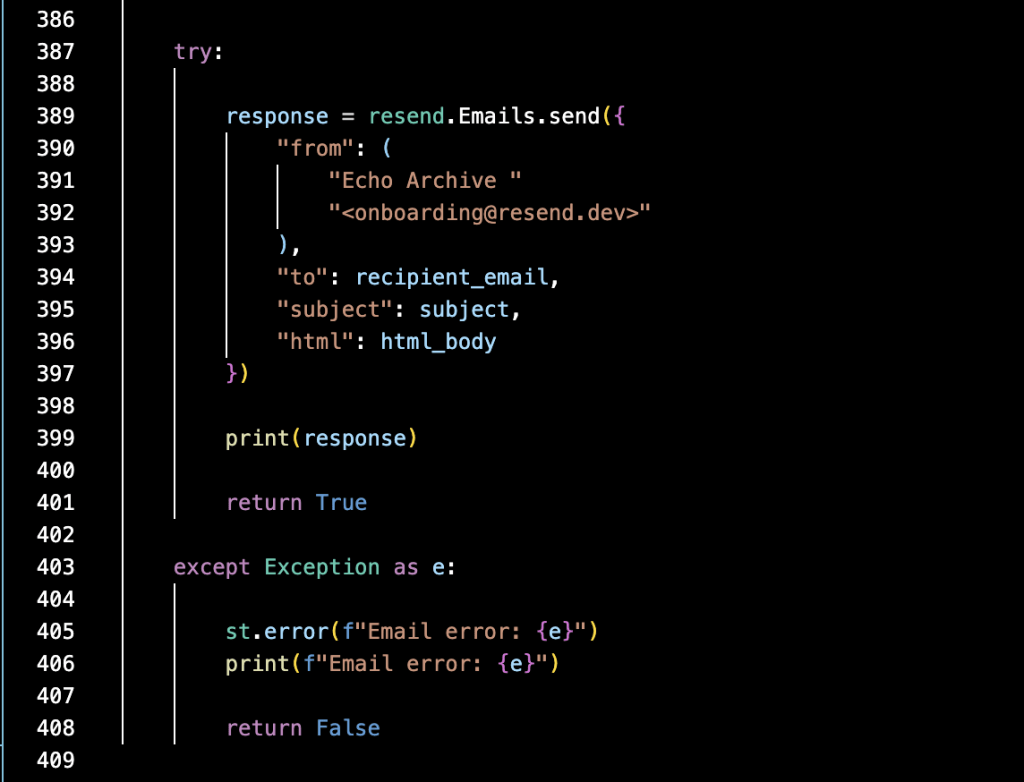
Presentation of Email
Why: Artwork link is at the top so that it is easily accessible to the user.
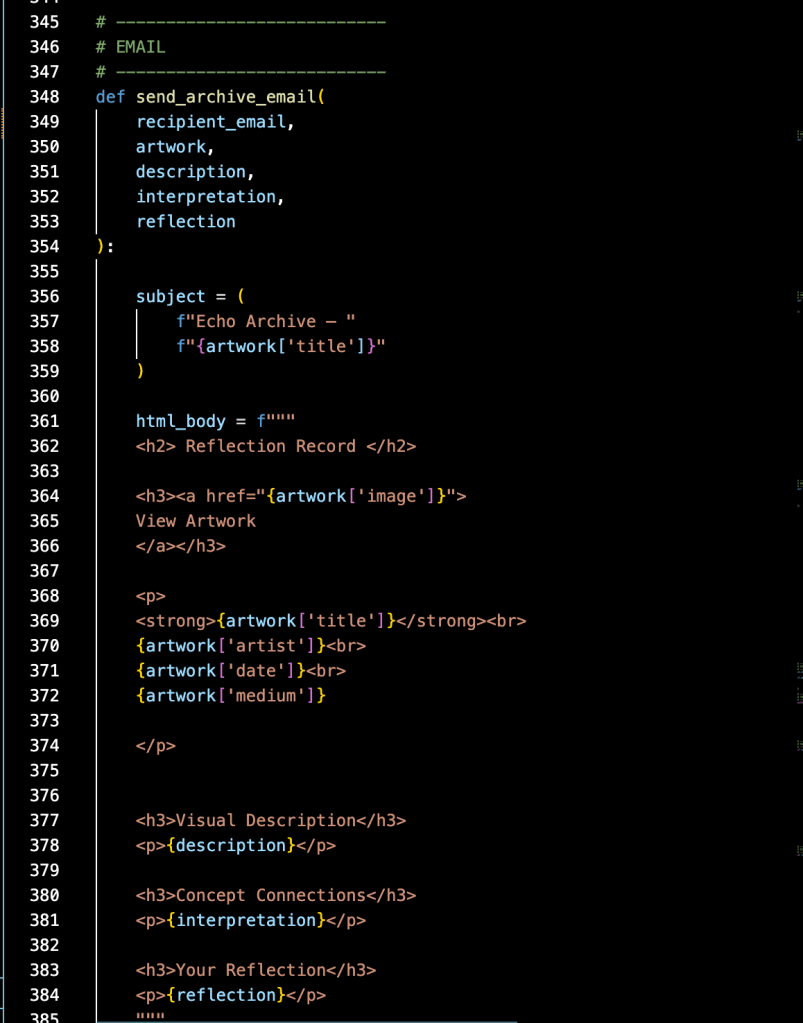
Resend API – Email Composition
Considerations when building this iteration of the app
- Environmental Impact of Generative AI; reduced API pings in light of this
- More can be referenced at:
- Harvard Business Review: The Uneven Distribution of AI’s Environmental Impacts
- MIT News: Explained: Generative AI’s environmental impact
- United Nations Environment Programme: AI has an environmental problem. Here’s what the world can do about that.
- More can be referenced at:
- Concerns of outsourcing thought (faustian bargain); set up “interpretation” to ask users follow up questions rather than finalizing thought for them.
- I’m referencing Marshall McLuhans theory on Media Ecology. A later theorist, Neil Postman states that the job of Media Ecology is to ask: What are the moral implications of this bargain? Are the consequences more humanistic or antihumanistic? Do we, as a society, gain more than we lose, or do we lose more than we gain? Read more here: A first look at Media Ecology, Dawson College
- Generative AI becoming eerie when developing connections on behalf of user
- MIT Technology Review: Reckoning with generative AI’s uncanny valley
Known Issues
- Architecture:
- No QA integrated in software [referencing Anthropic’s article on AI evals for more on this]
- No current error logging associated with API calls to ARTIC
- Email:
- Resend API is not currently connected to DNS files*
- When clicking “Send Email” the ‘Reflection’ resets and only keeps the first line of text (possible session state failure or Resend error)
- Email does not include users original input (quick-fix)**
- Artwork Retrieval
- ARTIC houses some objects with images where the images are place holders for other documents
*Resend was changed to gmail due to lack of private domain to upload DNS records. Implemented 5/20/26
**Email Quick Fix implemented on 5/23/26
Things I learned the hard way
- Always have a sandbox to test in before going live
- Double check remote -v before pushing from local to github repository
- Run python debugger before push
- Store secret keys appropriately in .env, live environments, personal records. Along with that, gitignore is very important
- Aligning ‘requirements.txt’, ‘.env’, and ‘app.py’ so that imports and early config is set up appropriately
- There’s no such thing as “easily transitioning” from Streamlit hosted to Hugging Face hosted
- Layering multiple APIs and forcing dependencies on each other causes major latency issues that cannot be fixed with caching
- It’s easier to include fail reasons in your sandbox UI rather than studying existing code for mistakes
Next Steps
- Develop phrasing to more accurately walk user through process
- Find ways to QA descriptions and interpretations; further manage AI prompts
- Incorporate a chatbot so the user can interact with the “interpretation”
- Decide if this can still work within the mission. Is there a limit on chat time, can it prompt user to go deeper with their own thoughts?
- Alternative Project: Focus on Greek myths and statues; develop database, set gemini as translator connecting user input to specific stories.
Develop a small database mapping modern motifs to artwork (250 images max)
- Structure each record with consistent fields (title, artist, date, medium, classification, image URL) to support reliable downstream use in the app
- Use Gemini to generate short “archive summaries” (50–80 words) that capture emotional tone, visual structure, and conceptual tension
- Store the dataset locally (CSV/Parquet) and treat it as a fixed curatorial archive rather than a constantly expanding or live system
- Use this archive as a mapping layer between modern user inputs (ideas, emotions, abstract motifs) and historical artworks through association rather than exact keyword matching
- Design the dataset specifically to support AI-assisted interpretation and reflection within the Streamlit application
How it started & a few iterations
This started as a basic python project to solidify my knowledge after Business Programming course. I’m someone who learns through projects and I wanted to play with the random functionality.
Iteration #1:
This iteration, Synthetic Seer, pulls together commentary on search history, symbology of Tarot cards, and AI oracles. The user manually inputs their 3 most recent searches > draws a random tarot card > Hugging Face API generates a tarot that connects their drawn tarot card to user input (ex., user searched mac & cheese recipe, drew 2 of wands, then hugging face would generate a tarot card containing 2 forks) > Gemini 2.5 flash gives oracle interpretation.
This was a fun and silly app, but I had concerns about the environmental impact of image-generation and the ethical implications of AI rendered artwork. With that in mind, I pivoted to real works of art from the MET.
Iteration #2-3:
I set up the APIs to retrieve 40 artworks and had gemini pick out the best of 40 based on user input. But I found that the METs archive was too large and undefined. There were issues with latency and caching. The API – AI layering was ultimately convoluted and disrupted the magic of discovery. So messy, in fact, that it is now on a private repository never to be seen again.
Iteration #4-6:
I switched from MET to ARTIC. I valued the vast metadata and object availability in ARTIC API. Things are still pretty silly here because it opens with a tarot pull, a random artwork and then generative AI acts as an oracle reader. It’s far too entertaining to abandon. Linked below.
Muse-bot Live App
Github for muse-bot
Later Iterations:
I found that the best thing about my app was that it shared real artwork with people who would have never otherwise encountered it. I pushed forward with that in mind. I strive to make sure AI supports human connection to art rather than replaces it.
The Name “Echo Archive”
Echo: In Greek mythology, Echo is a nymph whose voice was stolen by Hera, leaving her only able to repeat the words of others. This app embraces her name to redefine that ‘echo’: rather than a tragic mimicry, it provides an opportunity for art to resonate and be preserved in the minds of viewers.
Archive: Here, “archive” is both a noun and a verb. It’s both the historical record from the museum, and the personal record users create when emailing themselves. The email is a rich archive because it includes details of the artwork, genAI descriptions, and further intelligent synthesis.
See other portfolio projects here:
 Susanna Dancy